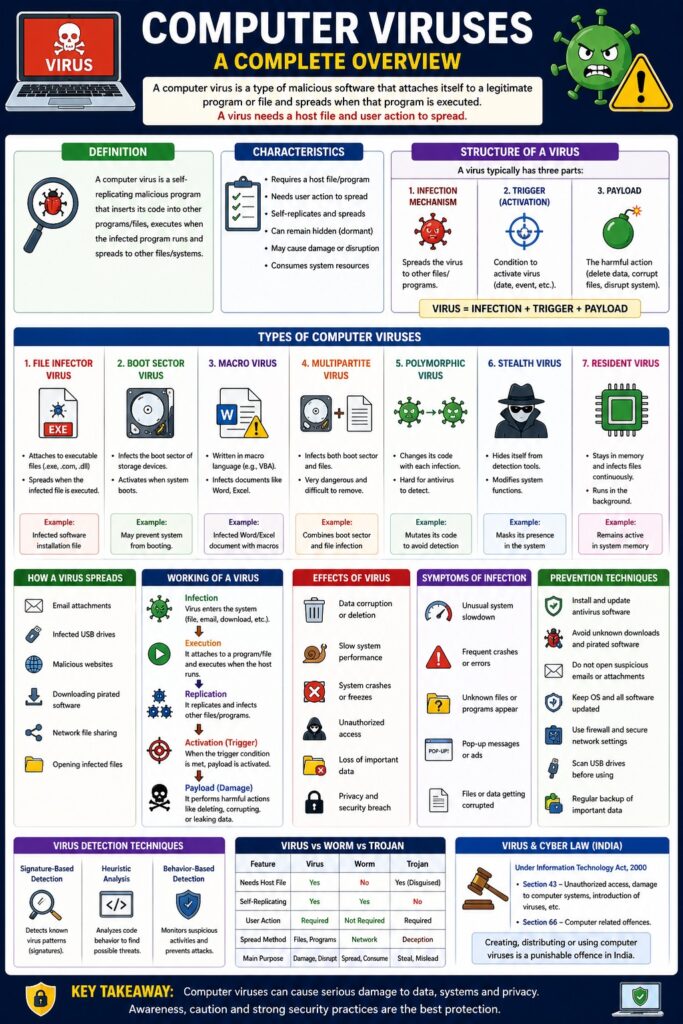
Computer Viruses (Malware) – Detailed Explanation
Introduction
A computer virus is a type of malicious software that attaches itself to a legitimate program or file and spreads when that program is executed. It can replicate, damage data, slow systems, or give unauthorized access to attackers.
👉 “A virus needs a host file and user action to spread.”
Definition
A computer virus is a self-replicating malicious program that:
- Inserts its code into other programs/files
- Executes when the infected program runs
- Spreads to other systems or files
Characteristics of Computer Virus
- Requires a host file/program
- Needs user action (execution)
- Can replicate and spread
- May remain hidden (dormant)
- Causes damage or disruption
Structure of a Computer Virus
A virus typically has three parts:
- Infection Mechanism
- Spreads the virus to other files
- Trigger (Activation)
- Condition to activate virus (date, event)
- Payload
- The harmful action (delete data, corrupt files)
Virus = Infection + Trigger + Payload
Types of Computer Viruses
1. File Infector Virus
- Attaches to executable files (.exe)
Example: Infected software installation file
2. Boot Sector Virus
- Infects boot sector of storage devices
Effect: System fails to boot
3. Macro Virus
- Infects documents (Word, Excel)
Example: Infected Word file with macros
4. Multipartite Virus
- Infects both boot sector and files
📌 Very dangerous and difficult to remove
5. Polymorphic Virus
- Changes its code to avoid detection
📌 Hard for antivirus to detect
6. Stealth Virus
- Hides itself from detection tools
7. Resident Virus
- Stays in memory and infects files continuously
How a Virus Spreads
- Email attachments
- Infected USB drives
- Downloading pirated software
- Visiting malicious websites
- Network file sharing
Working of a Virus
Step-by-Step Process
- Virus enters system (file/email/download)
- Attaches to a program
- Executes when program runs
- Replicates to other files
- Activates payload
Infection → Execution → Replication → Activation → Damage
Effects of Computer Virus
- Data corruption or deletion
- Slow system performance
- System crashes
- Unauthorized access
- Loss of important data
Symptoms of Virus Infection
- Unusual system slowdown
- Frequent crashes
- Unknown files/programs
- Pop-up messages
- Files getting corrupted
Prevention Techniques
- Install antivirus software
- Avoid unknown downloads
- Do not open suspicious emails
- Regular system updates
- Use firewalls
- Scan USB devices
Virus Detection Techniques
- Signature-based detection
- Heuristic analysis
- Behavior-based detection
Virus vs Worm vs Trojan
| Feature | Virus | Worm | Trojan |
|---|---|---|---|
| Needs host | Yes | No | Yes (disguised) |
| Self-replicating | Yes | Yes | No |
| User action | Required | Not required | Required |
Computer Virus and CIA Triad
- Confidentiality → Data theft
- Integrity → Data modification
- Availability → System disruption
Computer Virus and Cyber Law (India)
Under IT Act, 2000:
- Section 43 → Damage due to virus
- Section 66 → Computer-related offences
📌 Creating or spreading viruses is a punishable offence.
Real-Life Example
- Virus spreading through email attachments
- Infection via pirated software download
Advantages (from attacker perspective)
- Data theft
- System control
- Financial gain
Disadvantages (for users)
- Data loss
- Privacy breach
- Financial damage
Conclusion
Computer viruses are one of the most common and dangerous forms of malware. They spread through infected files and can cause serious damage to systems and data. Understanding their types, working, and prevention methods is essential for maintaining system security and data protection.
📘 MCA Exam Tip
For 10–15 marks:
- Definition
- Characteristics
- Types (4–6)
- Working process
- Effects & prevention