Trojans (Trojan Horse Malware) – Detailed Explanation
Introduction
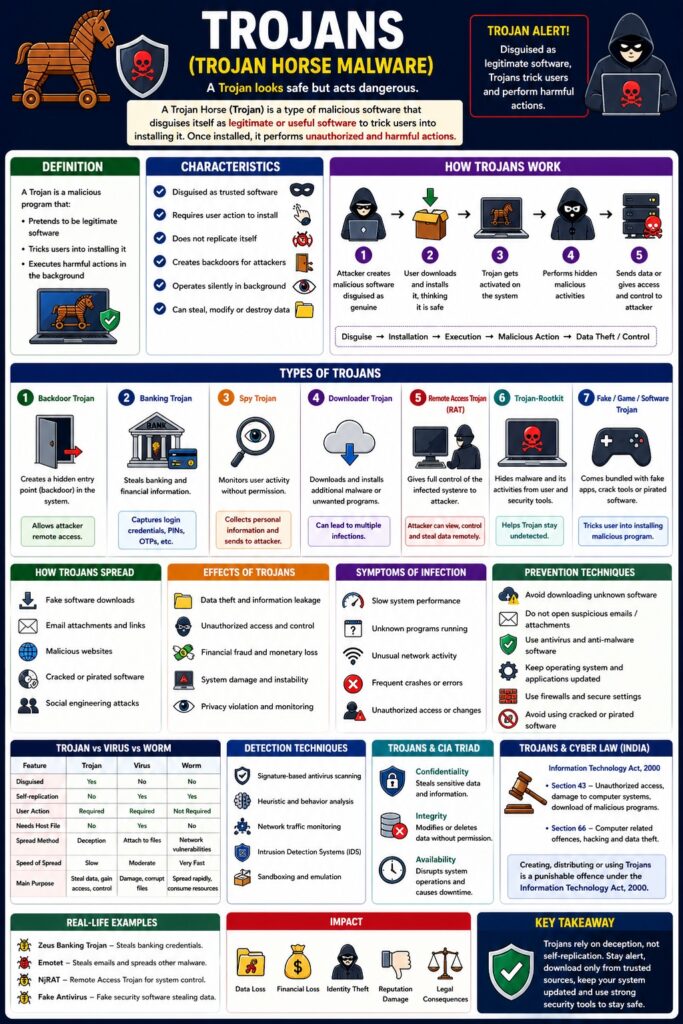
A Trojan Horse (Trojan) is a type of malicious software that disguises itself as legitimate or useful software to trick users into installing it. Once installed, it performs unauthorized and harmful actions.
👉 “A Trojan looks safe but acts dangerous.”
Unlike viruses and worms, Trojans do not self-replicate—they rely on user deception.
Definition
A Trojan is a malicious program that:
- Pretends to be legitimate software
- Tricks users into installing it
- Executes harmful actions in the background
Characteristics of Trojans
- Disguised as trusted software
- Requires user action to install
- Does not replicate itself
- Creates backdoors for attackers
- Operates silently in background
How Trojans Work
Step-by-Step Process
- Attacker creates malicious software disguised as genuine
- User downloads/installs it
- Trojan gets activated
- Performs hidden malicious activities
- Sends data or gives access to attacker
Disguise → Installation → Execution → Malicious Action → Data Theft / Control
Types of Trojans
1. Backdoor Trojan
- Creates a hidden entry point (backdoor)
📌 Allows attacker remote access
2. Banking Trojan
- Steals banking and financial data
📌 Captures login credentials and OTPs
3. Spy Trojan
- Monitors user activity
📌 Collects personal information
4. Downloader Trojan
- Downloads additional malware
5. Remote Access Trojan (RAT)
- Gives full control of system to attacker
6. Trojan-Rootkit
- Hides malware and avoids detection
7. Game/Software Trojan
- Fake apps or cracked software
How Trojans Spread
- Fake software downloads
- Email attachments
- Malicious websites
- Cracked/pirated software
- Social engineering attacks
Effects of Trojans
- Data theft
- Unauthorized access
- Financial fraud
- System damage
- Privacy violation
Symptoms of Trojan Infection
- Slow system performance
- Unknown programs running
- Unusual network activity
- Frequent crashes
- Unauthorized access
Trojans vs Virus vs Worm
| Feature | Trojan | Virus | Worm |
|---|---|---|---|
| Disguised | Yes | No | No |
| Self-replication | No | Yes | Yes |
| User action | Required | Required | Not required |
| Purpose | Steal/control | Damage | Spread |
Prevention Techniques
- Avoid downloading unknown software
- Do not open suspicious email attachments
- Use antivirus software
- Keep system updated
- Use firewalls
- Avoid pirated software
Detection Techniques
- Antivirus scanning
- Behavior analysis
- Network monitoring
Trojans and CIA Triad
- Confidentiality → Data theft
- Integrity → Unauthorized changes
- Availability → System disruption
Trojans and Cyber Law (India)
Under IT Act, 2000:
- Section 43 → Unauthorized access/data theft
- Section 66 → Cyber offences
📌 Creating or distributing Trojans is punishable.
Real-Life Examples
- Fake antivirus software
- Banking malware stealing login credentials
- Cracked software containing Trojan
Advantages (Attacker Perspective)
- Easy to spread via deception
- Hard to detect
- Provides remote control
Disadvantages (User Perspective)
- Data loss
- Privacy breach
- Financial loss
Conclusion
Trojans are dangerous malware that rely on user trust and deception. They do not spread automatically but can cause serious damage once installed. Awareness, cautious downloading, and proper security tools are essential to prevent Trojan attacks.
📘 MCA Exam Tip
For 10–15 marks:
- Definition
- Characteristics
- Types (4–6)
- Working
- Effects + prevention