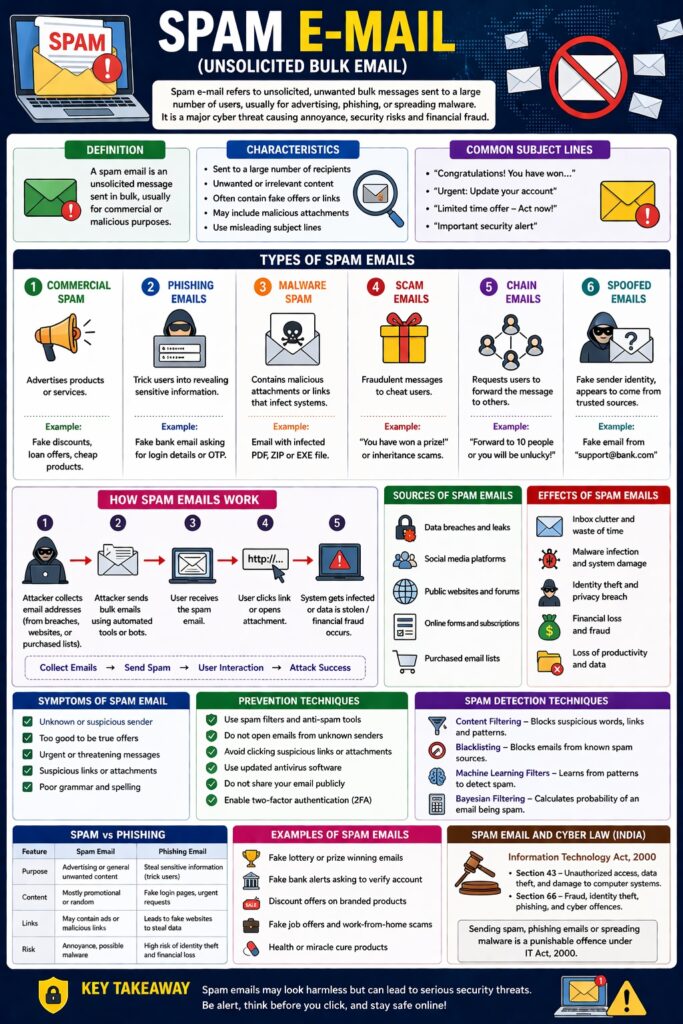
SPAM E-mail (Unsolicited Bulk Email)
Introduction
SPAM e-mail refers to unsolicited, unwanted bulk messages sent to a large number of users, usually for advertising, phishing, or spreading malware.
👉 “Spam = Unwanted + Mass + Electronic Mail”
Spam emails are one of the most common cyber security threats, causing annoyance, security risks, and financial fraud.
Definition
A spam email is:
- An unsolicited message
- Sent in bulk
- Usually for commercial or malicious purposes
Characteristics of Spam Emails
- Sent to a large number of recipients
- Unwanted or irrelevant content
- Often contain fake offers or links
- May include malicious attachments
- Use misleading subject lines
Types of Spam Emails
1. Commercial Spam
- Advertises products/services
Example: Fake discounts, lottery offers
2. Phishing Emails
- Trick users into revealing sensitive information
Example: Fake bank email asking for login details
3. Malware Spam
- Contains malicious attachments or links
Example: Email with infected PDF or software
4. Scam Emails
- Fraudulent messages to cheat users
Example: “You have won a prize”
5. Chain Emails
- Request users to forward messages
6. Spoofed Emails
- Fake sender identity
📌 Appears to come from trusted sources
How Spam Emails Work
Step-by-Step Process
- Attacker collects email addresses
- Sends bulk emails using automated tools
- User receives email
- User clicks link or opens attachment
- System gets infected or data is stolen
Collect Emails → Send Spam → User Interaction → Attack Success
Sources of Spam Emails
- Data breaches
- Social media
- Public websites
- Purchased email lists
Effects of Spam Emails
- Inbox clutter
- Waste of time
- Malware infection
- Identity theft
- Financial loss
Symptoms of Spam Email
- Unknown sender
- Too good to be true offers
- Urgent messages
- Suspicious links
- Poor grammar
Prevention Techniques
- Use spam filters
- Do not open unknown emails
- Avoid clicking suspicious links
- Use antivirus software
- Do not share email publicly
- Enable two-factor authentication
Spam Detection Techniques
- Content filtering
- Blacklisting
- Machine learning filters
- Bayesian filtering
Spam Email and Cyber Law (India)
Under IT Act, 2000:
- Section 43 → Unauthorized access/data misuse
- Section 66 → Fraud and cyber offences
📌 Phishing and spam-related frauds are punishable.
Real-Life Examples
- Fake bank emails asking for OTP
- Fraud emails offering lottery winnings
- Emails spreading ransomware
Advantages (for attackers)
- Low cost
- Wide reach
- High success rate
Disadvantages (for users)
- Security risks
- Privacy issues
- Financial fraud
Spam and CIA Triad
- Confidentiality → Data theft via phishing
- Integrity → Malware modifies data
- Availability → Email system overload
Conclusion
Spam emails are a major cyber threat that can lead to fraud, malware infection, and data theft. Understanding their types and characteristics helps users identify and avoid them. Using security tools and awareness is essential to protect against spam attacks.
📘 MCA Exam Tip
For 10–15 marks:
- Definition
- Types (4–6)
- Working
- Effects + prevention
- Real-life examples