Here is a clear, exam-oriented explanation of
🌐 Writing JavaScript into HTML
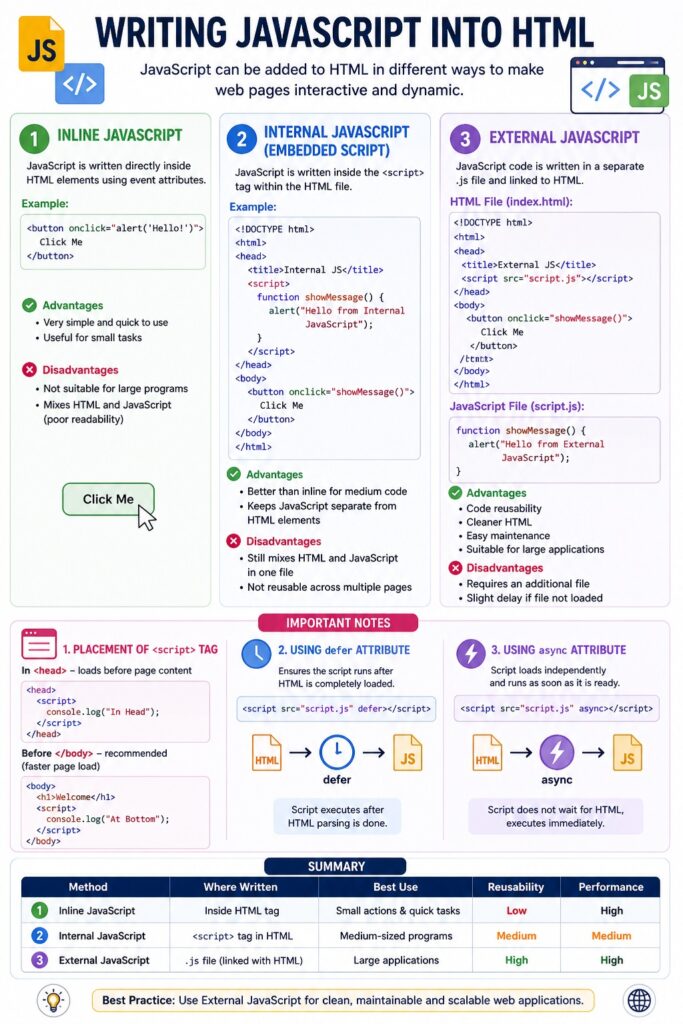
JavaScript can be included in an HTML document to make web pages dynamic and interactive. There are three main ways to write JavaScript in HTML.
🧩 1. Inline JavaScript
Inline JavaScript is written directly inside HTML elements using event attributes.
✅ Syntax:
<button onclick="alert('Hello!')">Click Me</button>
🔍 Explanation:
- JavaScript code is written inside the
onclickattribute. - It executes when the user clicks the button.
✔ Advantages:
- Very simple and quick to use
- Useful for small tasks
❌ Disadvantages:
- Not suitable for large programs
- Mixes HTML and JavaScript (poor readability)
📜 2. Internal JavaScript (Embedded Script)
JavaScript is written inside the <script> tag within the HTML file.
✅ Syntax:
<!DOCTYPE html>
<html>
<head>
  <title>Internal JS</title>
  <script>
    function showMessage() {
      alert("Hello from Internal JavaScript");
    }
  </script>
</head>
<body>

<button onclick="showMessage()">Click Me</button>

</body>
</html>
🔍 Explanation:
- The
<script>tag contains JavaScript code. - Can be placed in
<head>or<body>.
✔ Advantages:
- Better than inline for medium-sized code
- Keeps JavaScript separate from HTML elements
❌ Disadvantages:
- Still mixes HTML and JavaScript in one file
- Not reusable across multiple pages
📁 3. External JavaScript
JavaScript code is written in a separate .js file and linked to HTML.
✅ HTML File:
<!DOCTYPE html>
<html>
<head>
  <title>External JS</title>
  <script src="script.js"></script>
</head>
<body>

<button onclick="showMessage()">Click Me</button>

</body>
</html>
✅ JavaScript File (script.js):
function showMessage() {
  alert("Hello from External JavaScript");
}
🔍 Explanation:
- JavaScript is stored in a separate file.
- Linked using
srcattribute.
✔ Advantages:
- Code reusability
- Cleaner HTML
- Easy maintenance
- Suitable for large applications
❌ Disadvantages:
- Requires an additional file
- Slight delay if file not loaded
⚠️ Important Notes
1. Placement of <script> Tag
- In
<head>→ loads before page content - Before
</body>→ recommended (faster page load)
<script>
  console.log("Placed at bottom for better performance");
</script>
2. Using defer Attribute
<script src="script.js" defer></script>
👉 Ensures script runs after HTML is loaded
3. Using async Attribute
<script src="script.js" async></script>
👉 Script loads independently (used for external APIs)
🔄 Summary Table
| Method | Location | Best Use |
|---|---|---|
| Inline | Inside HTML tag | Small actions |
| Internal | <script> tag | Medium programs |
| External | .js file | Large applications |
🎯 Conclusion
Writing JavaScript into HTML is essential for:
- Creating interactive web pages
- Handling user events
- Performing dynamic operations
👉 Among all methods, External JavaScript is the best practice for real-world development.