
Booting and Shutting Down Process in Linux
1. Introduction
The booting process in Linux refers to the sequence of steps through which the system starts from a powered-off state and becomes ready for user interaction.
The shutting down process is the controlled procedure to safely stop services, unmount file systems, and power off or restart the system.
Both processes are kernel-controlled and are critical for system stability and data safety.
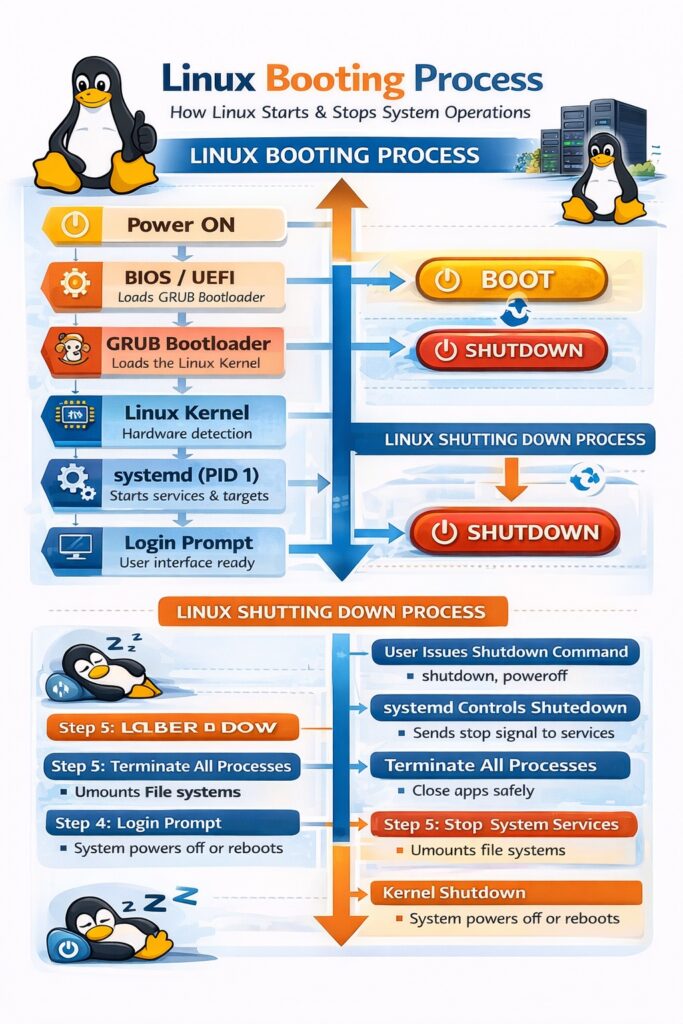
PART A: Linux Booting Process
2. What is Booting?
Booting is the process of loading the Linux operating system into memory and preparing it to run applications.
Linux uses a multi-stage boot process, which makes it reliable and flexible.
3. Stages of Linux Booting Process
Stage 1: BIOS / UEFI
- When power is switched on:
- BIOS or UEFI firmware runs
- Performs POST (Power-On Self-Test)
- Checks hardware (RAM, CPU, disk)
- Loads the bootloader from disk
📌 This stage is hardware-dependent.
Stage 2: Bootloader (GRUB)
- Common bootloader: GRUB (Grand Unified Bootloader)
- Responsibilities:
- Displays boot menu
- Allows OS selection
- Loads Linux kernel into RAM
- Loads initial RAM disk (
initrd/initramfs)
📌 GRUB gives flexibility to boot multiple OSs.
Stage 3: Kernel Initialization
- Kernel is decompressed and loaded into memory
- Kernel performs:
- Hardware detection
- Memory management initialization
- Device driver loading
- Mounts root file system (read-only initially)
📌 Kernel runs in kernel space.
Stage 4: Init Process / systemd
- Kernel starts the first user-space process
- Traditionally:
init(PID = 1) - Modern systems: systemd
Responsibilities:
- Starts system services
- Manages targets/runlevels
- Controls service dependencies
📌 systemd = backbone of modern Linux booting.
Stage 5: Runlevel / Target
Linux reaches a specific runlevel (target):
| Runlevel | Description |
|---|---|
| 0 | Halt |
| 1 | Single-user mode |
| 3 | Multi-user (CLI) |
| 5 | Multi-user (GUI) |
| 6 | Reboot |
(systemd uses targets like multi-user.target, graphical.target)
Stage 6: Login Prompt
- System displays:
- CLI login prompt (server)
- GUI login screen (desktop)
- User authentication begins
✅ Boot process completes here
4. Linux Boot Process Flow (Summary)
Power ON
  ↓
BIOS / UEFI
  ↓
GRUB Bootloader
  ↓
Linux Kernel
  ↓
systemd (PID 1)
  ↓
Services & Targets
  ↓
Login Prompt
PART B: Linux Shutting Down Process
5. What is Shutting Down?
Shutting down is the process of safely stopping the operating system, ensuring:
- No data loss
- All processes terminate properly
- File systems are safely unmounted
6. Steps in Linux Shutdown Process
Step 1: User Issues Shutdown Command
Common commands:
shutdown
poweroff
halt
reboot
Step 2: systemd Takes Control
- systemd receives shutdown signal
- Notifies all running services
Step 3: Termination of User Processes
- All logged-in users are notified
- Running applications are closed gracefully
- Background processes stopped
Step 4: Stopping System Services
- Services stopped in reverse order
- Ensures dependency safety
Examples:
- Web server stopped
- Database server stopped
- Network services stopped
Step 5: Unmounting File Systems
- File systems are unmounted
- Cached data written to disk
- Prevents file corruption
Step 6: Kernel Shutdown
- Kernel releases hardware resources
- Sends power-off or reboot signal
Step 7: System Power-Off / Restart
- System shuts down or restarts safely
7. Common Shutdown Commands (Exam-Focused)
| Command | Purpose |
|---|---|
shutdown now | Immediate shutdown |
shutdown -h now | Halt system |
shutdown -r now | Reboot system |
poweroff | Power off |
reboot | Restart system |
8. Importance of Proper Shutdown
- Prevents file system corruption
- Protects hardware
- Ensures data integrity
- Maintains system stability
9. Booting vs Shutting Down (Quick Comparison)
| Booting | Shutting Down |
|---|---|
| Loads OS into memory | Stops OS safely |
| Starts services | Stops services |
| Activates hardware | Releases hardware |
| Begins user interaction | Ends user interaction |
10. Conclusion
The booting and shutting down processes in Linux are carefully designed multi-stage procedures controlled by the kernel and systemd. Proper booting ensures system readiness, while proper shutdown ensures data safety, stability, and reliability, making Linux suitable for servers and enterprise environments.