
Password-Based Authentication
Introduction
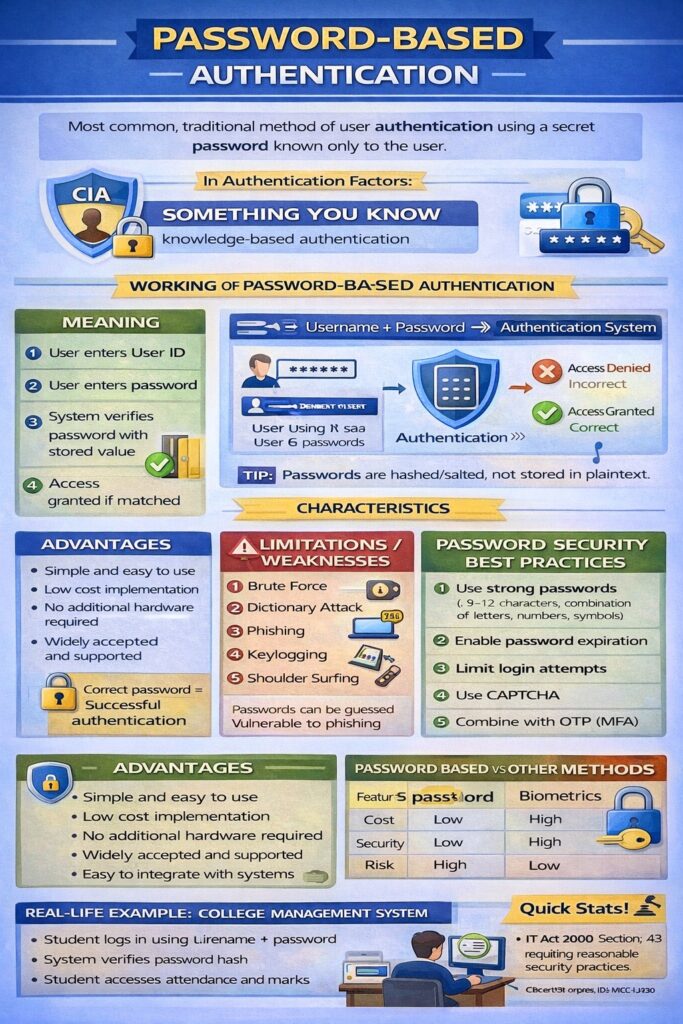
Password-Based Authentication is the most widely used and traditional method of user authentication. In this method, a user proves their identity by entering a secret password that is known only to the user and the system.
It falls under the authentication factor:
👉 “Something You Know”
Password-based authentication is commonly used in:
- Operating systems
- Email accounts
- University portals
- Banking and e-commerce websites
Meaning
Password-based authentication is a process in which:
- A user provides a User ID (username)
- The user enters a password
- The system verifies the password with the stored value
- Access is granted if it matches
📌 Correct password = Successful authentication
Working of Password-Based Authentication
Step-by-Step Process
- User enters username and password
- Password is encrypted or hashed
- System compares it with stored password hash
- If matched → access allowed
- If not matched → access denied
User → Username + Password → Authentication System → Access Granted / Denied
Storage of Passwords
For security reasons, passwords are not stored in plain text.
Secure Storage Methods
- Hashing (SHA-256, SHA-512)
- Salting (adding random data before hashing)
- Encrypted password databases
📌 Hashing is preferred over encryption for passwords.
Characteristics of Password-Based Authentication
- Secret information
- Static (does not change frequently)
- User-dependent
- Easy to implement
Advantages of Password-Based Authentication
- Simple and easy to use
- Low cost implementation
- No additional hardware required
- Widely accepted and supported
- Easy to integrate with existing systems
Limitations / Weaknesses
- Passwords can be guessed
- Vulnerable to phishing attacks
- Susceptible to brute force attacks
- Users reuse weak passwords
- Passwords can be forgotten or shared
📌 Password-only authentication provides low security.
Common Attacks on Password-Based Authentication
- Brute force attack
- Dictionary attack
- Phishing
- Keylogging
- Shoulder surfing
Password Security Best Practices
To improve password-based authentication security:
- Use strong passwords
- Minimum 8–12 characters
- Combination of letters, numbers, symbols
- Enable password expiration
- Limit login attempts
- Use CAPTCHA
- Combine with OTP (Multi-Factor Authentication)
- Never store passwords in plain text
Password-Based Authentication with MFA
Modern systems strengthen passwords by combining them with another factor.
Example
- Password (Something you know)
- OTP (Something you have)
📌 This is called Two-Factor or Multi-Factor Authentication.
Examples
- Email login using username and password
- College ERP login
- Social media account login
- ATM PIN (password-based)
Password-Based Authentication and Cyber Law (India)
Under IT Act, 2000:
- Section 43 → Unauthorized access due to weak authentication
- Organizations must implement reasonable security practices
- Weak password protection may lead to legal liability
Comparison: Password-Based vs Other Methods
| Feature | Password-Based | Biometrics |
|---|---|---|
| Cost | Low | High |
| Security | Low | High |
| Ease of use | Easy | Easy |
| Risk | High | Low |
Real-Life Example: College Management System
- Student logs in using roll number + password
- System verifies password
- Student accesses attendance and results
Conclusion
Password-based authentication is the simplest and most commonly used authentication method, but it provides limited security when used alone. Due to increasing cyber threats, modern systems enhance password authentication using hashing, salting, and multi-factor authentication. Proper password management is essential for maintaining system security and legal compliance.