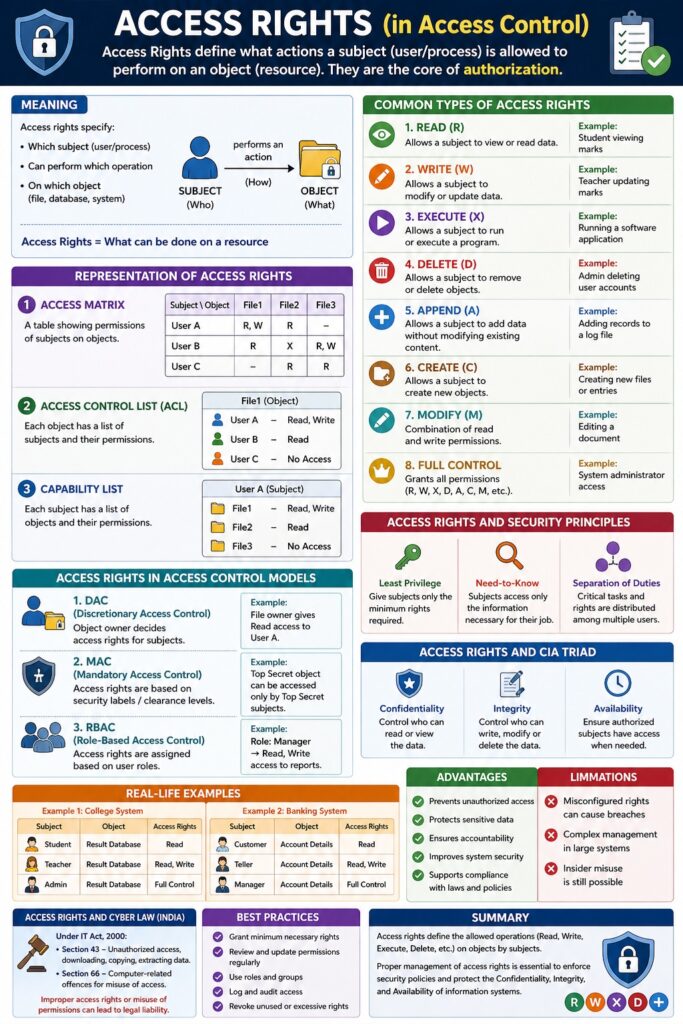
Access Rights (in Access Control)
Introduction
Access Rights (also called permissions or privileges) define what actions a subject is allowed to perform on an object. They are the core of authorization—once a user is authenticated, access rights determine the scope of their actions.
👉 Access Rights = What can be done on a resource
Meaning
Access rights specify:
- Which subject (user/process)
- Can perform which operation
- On which object (file, database, system)
📌 They enforce security by controlling operations like read, write, and execute.
Common Types of Access Rights
1. Read (R)
Meaning
Allows a subject to view or read data.
Example
- Student viewing marks
- Employee viewing reports
2. Write (W)
Meaning
Allows a subject to modify or update data.
Example
- Teacher updating student marks
- Editor modifying documents
3. Execute (X)
Meaning
Allows a subject to run or execute a program.
Example
- Running a software application
- Executing a script
4. Delete (D)
Meaning
Allows a subject to remove or delete objects.
Example
- Admin deleting user accounts
- Removing files
5. Append (A)
Meaning
Allows a subject to add data without modifying existing content.
Example
- Adding records to a log file
6. Create (C)
Meaning
Allows a subject to create new objects.
Example
- Creating new files or database entries
7. Modify (M)
Meaning
Combination of read and write permissions.
Example
- Editing a document
8. Full Control
Meaning
Grants all permissions (read, write, execute, delete, etc.)
Example
- System administrator access
Representation of Access Rights
Access Matrix
A table showing permissions of subjects on objects.
| Subject/Object | File1 | File2 |
|---|---|---|
| User A | R, W | R |
| User B | R | X |
Access Control List (ACL)
Each object has a list of:
- Users
- Their permissions
Example:
File1:
User A → Read, Write
User B → Read
Capability List
Each subject has a list of:
- Objects
- Permissions
Access Rights in Access Control Models
1. DAC (Discretionary Access Control)
- Owner assigns access rights
2. MAC (Mandatory Access Control)
- Based on security labels
3. RBAC (Role-Based Access Control)
- Based on user roles
📌 Example: Manager role → Read + Write access
Access Rights and Security Principles
- Least Privilege → Minimum rights assigned
- Need-to-Know → Only necessary access
- Separation of Duties → Distributed rights
Access Rights and CIA Triad
- Confidentiality → Control read access
- Integrity → Control write/modify access
- Availability → Ensure authorized access
Real-Life Examples
Example 1: College System
- Student → Read (view results)
- Teacher → Read + Write (update marks)
- Admin → Full control
Example 2: Banking System
- Customer → Read (account details)
- Teller → Read + Write (transactions)
- Manager → Full control
Access Rights in Cyber Law (India)
Under IT Act, 2000:
- Section 43 → Unauthorized access or misuse
- Section 66 → Computer-related offences
📌 Improper access rights may lead to legal liability.
Advantages of Access Rights
- Prevent unauthorized access
- Protect sensitive data
- Ensure accountability
- Improve system security
- Support compliance
Limitations
- Misconfigured permissions can cause breaches
- Complex management in large systems
- Insider misuse risk
Conclusion
Access rights are the foundation of authorization and access control systems. By clearly defining what actions subjects can perform on objects, organizations can ensure secure, controlled, and efficient use of resources. Proper management of access rights is essential to maintain confidentiality, integrity, and availability of information.
📘 MCA Exam Tip
For 10–15 marks:
- Define access rights
- Explain types (R, W, X, etc.)
- Include access matrix / ACL
- Give examples
- Link with CIA Triad