
Understanding the Linux Kernel
1. Introduction
The Linux Kernel is the core component of the Linux operating system. It is responsible for direct interaction with hardware and for managing all critical system resources. Every operation performed by a user or application—such as running a program, saving a file, or accessing memory—ultimately passes through the kernel.
Linux follows a design philosophy where the kernel remains independent of user interfaces, making it powerful, stable, and flexible.
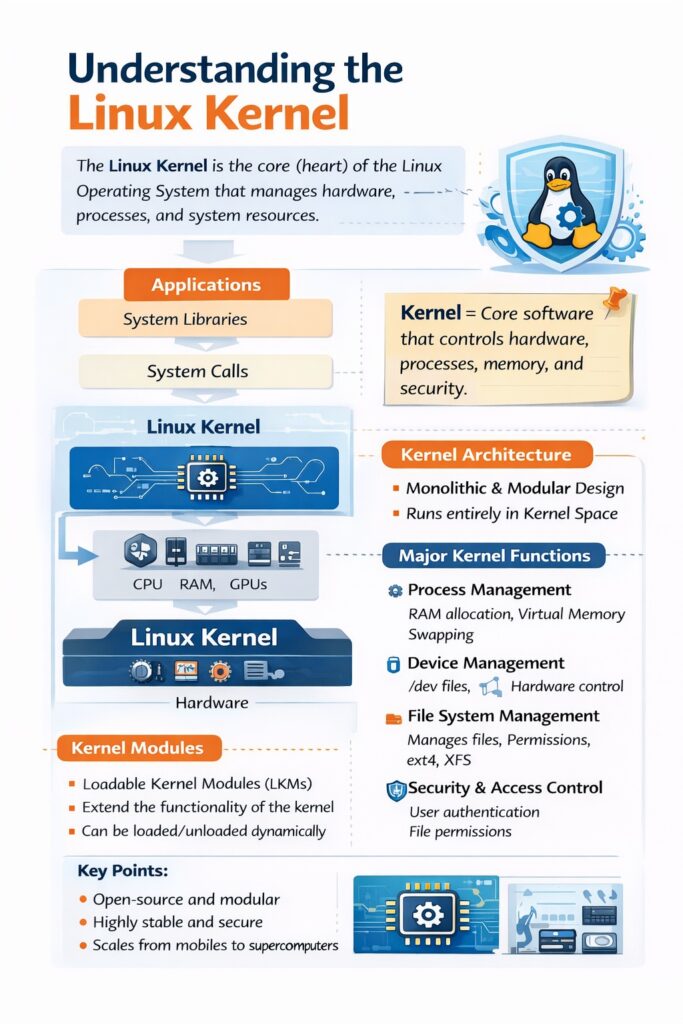
2. Role of the Linux Kernel
The kernel acts as an interface between hardware and software. Applications do not access hardware directly; instead, they request services from the kernel using system calls. This controlled access ensures security, stability, and fairness in resource usage.
3. Linux Kernel Architecture
Linux uses a monolithic kernel architecture with modular design.
Monolithic Nature
- All major services (process, memory, file system, device drivers) run in kernel space
- Results in high performance
Modular Capability
- Kernel supports Loadable Kernel Modules (LKMs)
- Drivers and features can be added or removed without rebooting
👉 Hence, Linux is often described as a
“Monolithic Kernel with Modular Extensions”
4. Kernel Space vs User Space
User Space
- Applications and GUI run here
- Limited access to system resources
- Safer environment
Kernel Space
- Kernel executes here
- Full access to hardware
- Highly protected
This separation prevents system crashes caused by faulty user programs.
5. Major Functions of the Linux Kernel
5.1 Process Management
The kernel manages all processes in the system.
Responsibilities:
- Process creation (
fork) - Process execution (
exec) - Process termination
- CPU scheduling
- Context switching
Key Concepts:
- Each process has a Process ID (PID)
- Supports multitasking and multiprocessing
- Uses scheduling algorithms for fair CPU usage
📌 Example commands:
pstophtop
5.2 Memory Management
Memory management is a critical responsibility of the kernel.
Functions:
- Allocation and deallocation of RAM
- Virtual memory management
- Paging and swapping
- Memory protection between processes
Features:
- Each process gets its own virtual address space
- Prevents one program from accessing another’s memory
📌 Result: Better performance and security
5.3 Device Management
The kernel manages hardware devices through device drivers.
Key Points:
- Every device is treated as a file
- Device drivers act as translators between hardware and kernel
- Supports plug-and-play devices
📌 Examples:
- Hard disk →
/dev/sda - Keyboard →
/dev/input - USB devices →
/dev/usb
5.4 File System Management
The kernel manages how data is stored and accessed.
Responsibilities:
- File creation, deletion, and access
- Directory structure management
- File permissions and ownership
- Supports multiple file systems
Supported File Systems:
- ext4
- XFS
- Btrfs
- FAT, NTFS (with support)
5.5 System Call Interface
System calls provide a controlled way for applications to request kernel services.
Why system calls are needed:
- Applications cannot directly access hardware
- Kernel ensures secure and valid operations
Common System Calls:
read()write()open()close()fork()exec()
5.6 Security and Access Control
The kernel enforces security policies.
Security Functions:
- User authentication
- Permission checks (read, write, execute)
- User and group IDs
- Access control enforcement
Kernel-Level Protection:
- Prevents unauthorized access
- Separates user activities
6. Kernel Modules
Kernel modules extend the kernel’s functionality dynamically.
Characteristics:
- Loaded at runtime
- Reduce kernel size
- Improve flexibility
Examples:
- Network drivers
- File system drivers
- USB drivers
📌 Commands:
lsmod– list loaded modulesmodprobe– load modulermmod– remove module
7. Linux Kernel Boot Process (Brief)
- BIOS/UEFI starts system
- Bootloader (GRUB) loads kernel
- Kernel initializes hardware
- Kernel starts
initorsystemd - User space services start
8. Advantages of Linux Kernel
- Open source and customizable
- Highly stable and secure
- Efficient resource management
- Scalable (from mobiles to supercomputers)
- Strong community support
9. Real-World Applications
- Web and cloud servers
- Android operating system
- Embedded systems
- Network devices
- Supercomputers
10. Conclusion
The Linux kernel is a robust, efficient, and secure core that forms the foundation of the Linux operating system. Its modular monolithic design, efficient resource management, and strict security controls make Linux the preferred OS for servers, cloud platforms, and enterprise systems.