
Session Management in JSP
Introduction
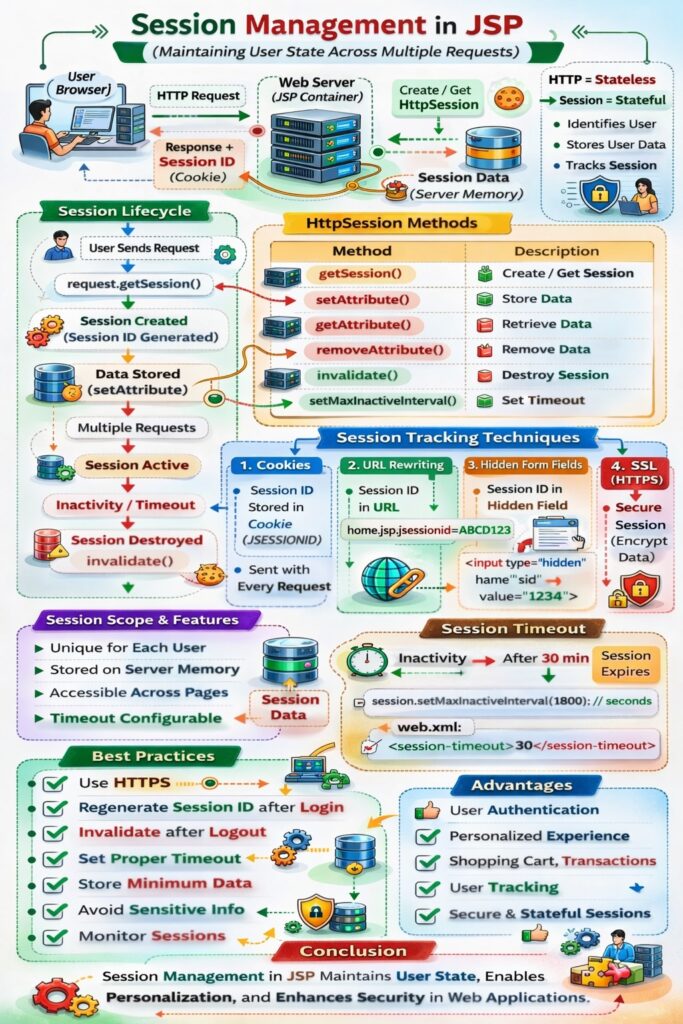
Session management in JSP is the technique used to maintain user-specific data across multiple HTTP requests. Since the HTTP protocol is stateless, the server cannot automatically remember information about a user between requests. Session management enables JSP-based applications to track users and preserve data such as login status, preferences, and transactional information throughout a user’s interaction with the application.
JSP achieves session management mainly through the HttpSession interface, supported by other tracking mechanisms.
Need for Session Management
Session management is required to:
- Identify individual users
- Maintain login information
- Store user preferences
- Manage shopping carts
- Support multi-step transactions
Without session management, each request would be treated as a new and unrelated request.
Session Management Techniques in JSP
JSP supports the following session management techniques:
- HttpSession
- Cookies
- URL Rewriting
- Hidden Form Fields
1. HttpSession (Primary Technique)
What is HttpSession
HttpSession is a server-side mechanism that stores user-specific data in the server memory. Each session is identified by a unique session ID, which is usually maintained using cookies.
In JSP, the session implicit object represents the HttpSession.
Creating or Accessing a Session
<%
HttpSession sessionObj = request.getSession();
%>
- Creates a new session if none exists
- Returns existing session if already created
In JSP, this is often simplified using:
<%
session.setAttribute("user", "admin");
%>
Storing Data in Session
<%
session.setAttribute("username", "admin");
session.setAttribute("role", "manager");
%>
Retrieving Session Data
<%
String user = (String) session.getAttribute("username");
%>
Removing Session Attributes
<%
session.removeAttribute("username");
%>
Invalidating a Session
<%
session.invalidate();
%>
This ends the session and removes all stored data.
Session Timeout
Default Timeout
A session automatically expires after a period of inactivity.
Setting Timeout Programmatically
<%
session.setMaxInactiveInterval(1800); // seconds
%>
Setting Timeout in web.xml
<session-config>
    <session-timeout>30</session-timeout>
</session-config>
2. Session Management Using Cookies
Concept
- Session ID is stored in a cookie (
JSESSIONID) - Browser sends cookie with each request
- Server maps cookie to session data
Limitation
- Depends on browser cookie support
3. Session Management Using URL Rewriting
Concept
- Session ID is appended to the URL
- Used when cookies are disabled
Example
<a href="home.jsp;jsessionid=ABC123">Home</a>
Limitation
- Session ID visible in URL
- Security risks if URL is shared
4. Session Management Using Hidden Form Fields
Concept
- Session information stored in hidden form fields
- Data sent with each form submission
Example
<input type="hidden" name="sessionId" value="ABC123">
Limitation
- Works only with forms
- Not suitable for complex navigation
Scope of Session Data
Session data:
- Is unique per user
- Is available across multiple requests
- Is stored on the server
- Persists until session expires or is invalidated
Advantages of Session Management in JSP
- Maintains user state
- Supports personalized content
- Enables secure authentication
- Simplifies user tracking
- Essential for dynamic web applications
Security Considerations
- Use HTTPS to protect session IDs
- Avoid storing sensitive data directly in session
- Invalidate session after logout
- Regenerate session ID after login
- Set appropriate session timeout
Common Problems in Session Management
- Memory leaks due to unused sessions
- Session hijacking
- Long session timeout values
- Storing large objects in session
Best Practices
- Use HttpSession as primary technique
- Keep session data minimal
- Use request scope whenever possible
- Clean up session data after use
- Monitor session usage in large applications
Conclusion
Session management in JSP is a fundamental mechanism for maintaining user state in web applications. By using HttpSession and supporting techniques like cookies and URL rewriting, JSP applications can track users, manage authentication, and preserve data across requests. Proper session handling and security practices are essential to ensure performance, scalability, and protection against security threats in JSP-based systems.