
User Authentication – Means of Authentication
Introduction
User Authentication is the process of verifying the identity of a user before granting access to a system, network, or data. It answers the question:
👉 “Are you really who you claim to be?”
Authentication is a core security functional requirement and a key mechanism to ensure Confidentiality in the CIA Triad. It is widely used in operating systems, databases, networks, online banking, and e-governance systems.
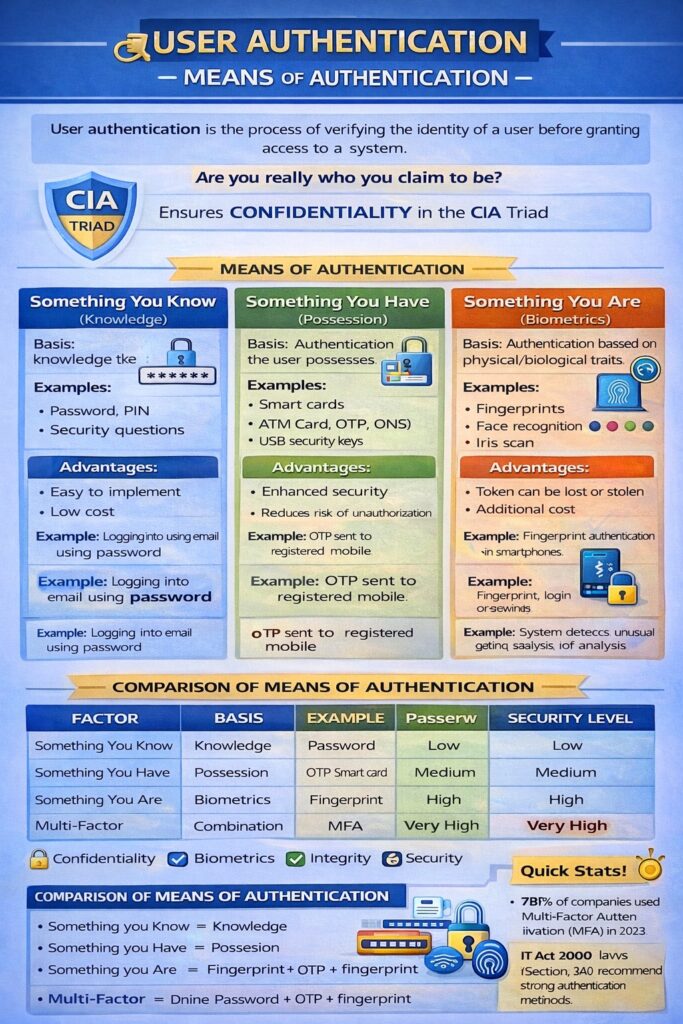
Means of Authentication
Authentication is commonly classified based on factors of authentication. These factors define how identity is verified.
1. Something You Know (Knowledge-based Authentication)
Meaning
Authentication based on secret information known only to the user.
Examples
- Password
- PIN
- Security questions
Working
The user enters secret credentials, which are compared with stored values in the system.
Advantages
- Easy to implement
- Low cost
- Widely used
Limitations
- Can be guessed or cracked
- Vulnerable to phishing and brute-force attacks
- Users may forget passwords
Example
Logging into email using username and password.
2. Something You Have (Possession-based Authentication)
Meaning
Authentication based on a physical or digital object possessed by the user.
Examples
- Smart cards
- ATM cards
- OTP (One-Time Password) via mobile
- Security tokens
- USB security keys
Working
The system verifies the token or code generated by the device.
Advantages
- More secure than passwords alone
- Reduces risk of unauthorized access
Limitations
- Token can be lost or stolen
- Additional cost for devices
Example
ATM card + PIN
Net banking login using OTP sent to registered mobile number.
3. Something You Are (Biometric Authentication)
Meaning
Authentication based on physical or behavioral characteristics of a user.
Types of Biometrics
- Fingerprint
- Face recognition
- Iris scan
- Voice recognition
- Signature dynamics
Advantages
- Very difficult to duplicate
- User-friendly
- High accuracy
Limitations
- Expensive hardware
- Privacy concerns
- Errors due to injury or environment
Example
Aadhaar-based fingerprint authentication.
4. Something You Do (Behavior-based Authentication)
Meaning
Authentication based on user behavior patterns.
Examples
- Typing speed
- Keystroke dynamics
- Mouse movement
- Gait (walking style)
Advantages
- Continuous authentication
- Hard to imitate
Limitations
- Accuracy varies
- Requires monitoring and analysis
Example
System detects unusual typing behavior and asks for re-authentication.
5. Something You Where (Location-based Authentication) (Optional / Advanced)
Meaning
Authentication based on user’s geographic location.
Examples
- IP address verification
- GPS location
- Geo-fencing
Example
Login blocked when attempted from an unknown country.
Multi-Factor Authentication (MFA)
Meaning
Using two or more authentication factors together.
📌 Most secure authentication method.
Example
- Password (Something you know)
- OTP (Something you have)
- Fingerprint (Something you are)
Advantages
- High security
- Strong protection against cyber attacks
Comparison of Means of Authentication
| Factor | Basis | Example | Security Level |
|---|---|---|---|
| Something you know | Knowledge | Password | Low |
| Something you have | Possession | OTP, Smart card | Medium |
| Something you are | Biometrics | Fingerprint | High |
| Multi-factor | Combination | Password + OTP | Very High |
Authentication in Cyber Law (India)
Under IT Act, 2000:
- Section 3 & 3A → Digital signatures & electronic authentication
- Weak authentication may lead to unauthorized access (Section 43)
Real-Life Example: Online Banking
- User ID & Password → Knowledge factor
- OTP → Possession factor
- Biometric (mobile app) → Biometric factor
Conclusion
User authentication is the first line of defense in computer security. Different means of authentication provide varying levels of security. Modern systems rely on multi-factor authentication to prevent unauthorized access and ensure data protection.